
Is WakeBox Legit?
Judging by the file and permissions, WakeBox is a real alarm clock; VirusTotal finds nothing. The risk is the Mail tab, which asks for Gmail access, and ads that show a different app.
Is WakeBox legit? Partly. WakeBox is a real alarm clock, and its file is clean on VirusTotal. But reviewers on Google Play say its ads show a different app, and its Mail tab asks for access to your Gmail. Use the alarm. Do not connect your mail. We did not install the app: this verdict rests on the file, its permissions, the screenshots and the reviews.
- Who it suits: people who want a plain alarm with a full-screen alert and accept ads.
- Price: $0. Google Play shows the "Contains ads" label and no "In-app purchases" label.
- Money: none. WakeBox is not a rewards app, and the listing promises no money.
- The catch: the Mail tab asks to read and write your Gmail, and the developer's own Data safety form says data is not encrypted in transit.
What WakeBox is
WakeBox is an Android alarm clock from BLYTHEWOOD NY LLC. It came to Google Play on Dec 30, 2025, and the last update, version 1.2.6, is dated Apr 15, 2026. The listing shows a 4.2 rating from 3.25K reviews, more than 1 million downloads and a Mature 17+ label.
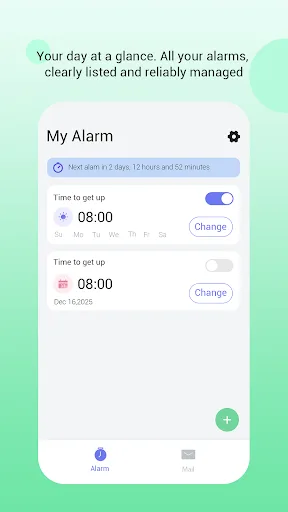
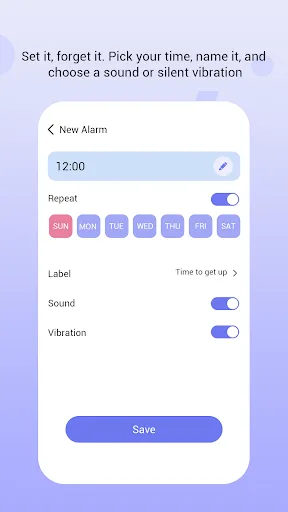
The short description in the store: an alarm clock with full-screen alerts and optional email access. The promo screenshots show three screens: an alarm list, a new-alarm form with repeat days, label, sound and vibration, and a ringing screen with a 1-minute snooze. There is no timer, stopwatch or world clock in them.
Is WakeBox safe?
| Check | Result |
|---|---|
| VirusTotal | 0 of 74 engines flagged the file, checked Sep 16, 2026 |
| Permissions | 21 in total. Android classes 1 as dangerous: notifications |
| Contacts, SMS, location, camera | Not requested |
| Advertising | Reads the advertising ID. AppGoblin found ad networks from Google, Facebook, AppLovin and Unity in the build |
| Data shared | Device or other IDs, for analytics and advertising |
| Data collected | Email address, optional |
| Encryption in transit | The Data safety form says data is not sent over a secure connection. The cleartext flag in the manifest is off (allows_cleartext_traffic = false), but there is a separate network security config; we did not check it or the traffic itself |
The file is clean, and the permission list is short for a free app. The weak point is what the developer says about data. The privacy policy, dated Dec 30, 2025, says the app does not share personal data with third parties for advertising. The Data safety form on Google Play says device IDs go to third parties for advertising. Both are the developer's, and they disagree.
The Mail tab is the risk
The description offers "optional access to email features through a built-in web view". A review from Sep 28, 2026, marked helpful by 78 people, says the app asks for permission to read and write emails in the user's Gmail account after launch.
An alarm clock does not need your mailbox. A mailbox holds password-reset letters for your other accounts, so access to it is worth more than any alarm function. The policy says sign-in data is not stored on the developer's servers. We did not install the app, so we did not check where the web view sends the session or how to decline the sign-in at launch. Our advice: leave the Mail tab alone and read mail in the Gmail app.
If you already gave access, open the linked apps page of your Google Account and remove WakeBox there.
The ads show a different app
Two Google Play reviews say the ads misrepresent the app. One from Sep 28, 2026 says ads inside other apps present WakeBox as a free app with short films, and it shows no films. One from Oct 30, 2026, marked helpful by 57 people, says the ad promised a different function and the app turned out to be about email. A third, from Nov 21, 2026, is about something else: WakeBox does less than Android's own Clock app.
AppGoblin estimates about 146,000 new installs a week. That is AppGoblin's estimate, not Google Play data; Google Play shows 1M+. The developer is hard to identify. The listing gives a Gmail address and an office address in New York, and the privacy policy sits on Google Sites. We found no company website and did not check the company register.
Where a rival wins
- The Clock app on your phone. It is already installed and adds no ad SDKs. If you only need to wake up at 7 a.m., you need nothing else.
- Alarm Clock. Its card lists a timer, a stopwatch, a world clock and sleep cycle tracking. The price is access: 47 permissions, 9 of them dangerous, location and phone state among them. It also needs Android 10.
- Google Calendar. Better when the reminder belongs to a date or an event.
WakeBox wins on one point: it asks for less than Alarm Clock and runs on Android 7.0.
How to install
- Catalog version: 1.2.6.
- Requires Android 7.0 or newer.
- File size: about 30 MB.
Get the APK on the WakeBox page on AppLoko. It is signed with the AppLoko key, so it will not install over a Google Play copy. Remove that one first. The policy says alarms are stored on the device, so set them again after reinstalling.
Sources
- Google Play listing of WakeBox: labels, rating, dates, Data safety form and reviews, read on Nov 26, 2026
- WakeBox privacy policy, updated Dec 30, 2025
- VirusTotal report for the catalog file, Sep 16, 2026
- AppGoblin: SDKs and install estimate, crawled Nov 25, 2026
- Google Account Help: manage linked apps