

Download terminal command watch face APK
Screenshots
- Version
- 250010103
- Size
- 5.9 MB
- Added
- Requires
- Android 8.0+
- Developer
- BitSky
- Category
- Personalization
About this app
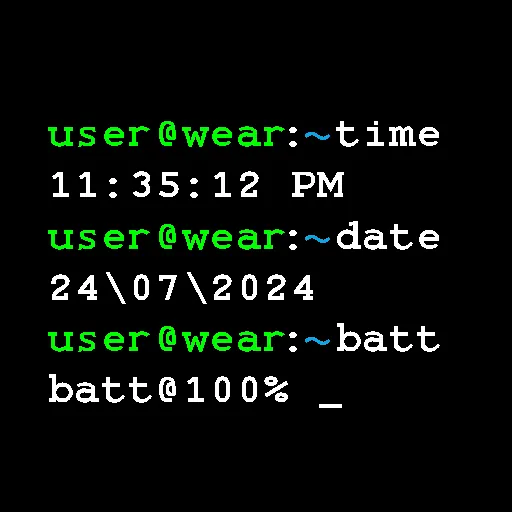
This watch face transforms your Wear OS smartwatch into a miniature terminal window, complete with monospaced fonts and a blinking cursor that mimics a classic command prompt. It is designed for developers, system administrators, tech enthusiasts, or anyone who appreciates the retro-futuristic aesthetic of early computing interfaces. Instead of a traditional analog or digital clock, you get a clean, text-based display that shows the current time, date, and battery level in a style that feels both nostalgic and functional.
The interface is fully customizable to match your preference. You can adjust the font size to make the text more readable at a glance, or change the alignment to position the information on the left, right, or center of the screen. The blinking cursor, just like in a real terminal, adds a subtle dynamic element that keeps the display feeling alive. Whether you are at your desk, in a meeting, or out for a run, this watch face gives you a distinctive look that stands out from the crowd of standard watch faces.
A key feature is the dedicated ambient mode, which reduces the display to a low-power state while still showing essential information. This ensures that the watch face is battery-friendly, so you can wear it all day without worrying about frequent charging. The terminal-style fonts are carefully selected to preserve the authentic look, even in dim light conditions.
To get started, you will need to install the companion app on your phone, which simplifies the installation process on your Wear OS watch. The watch face itself is free to use, and no additional permissions or in-app purchases are required. Please note that this watch face is optimized for Wear OS devices and may not work with other smartwatch platforms.
Before installing, ensure that your watch is running a compatible version of Wear OS. The companion app supports both phone and watch setups, making it easy to manage the watch face directly from your wrist or via your phone. If you are looking for a unique, geeky, and practical way to personalize your smartwatch, this terminal command prompt watch face is an excellent choice.
How do I download terminal command watch face?
Is terminal command watch face free on AppLoko?
What is the current version of terminal command watch face?
What Android version does terminal command watch face need?
What category is terminal command watch face in?
What should I do if terminal command watch face will not install?
Is it safe to download terminal command watch face from AppLoko?
Collections
Similar apps
All



Personalization
All Live Wallpaper - Wallpapers 4KPersonalization
 ThemePro - Widget & WallpaperPersonalization
 Themely - Icons & WidgetsPersonalization
 Walli - Stunning 4K WallpapersPersonalization
 Niagara Launcher ‧ Home ScreenPersonalization
 CMM LauncherPersonalization
 Action Launcher: Pixel EditionPersonalization
 4K Wallpapers - Auto ChangerPersonalization
 Microsoft SwiftKey AI KeyboardPersonalization
 Yandex Browser with Alice AIPersonalization
Popular
 Google ChromeCommunication
 Google MapsNavigation & Maps
 Google DriveProductivity & Office
 Google CalendarProductivity & Office
 YouTube MusicMusic & Audio
 Google AssistantProductivity & Office
 Facebook LiteSocial Networks
 Samsung BrowserCommunication
 Mi MusicPhoto & Video
 TelegramCommunication
 LinkedIn: Community & NetworkProductivity & Office
 Samsung HealthHealth & Fitness