

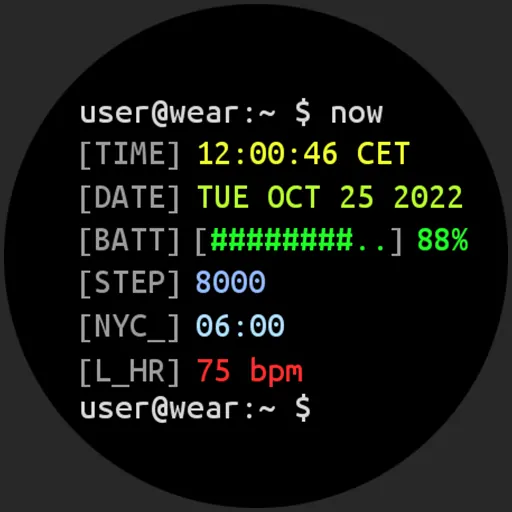
Download Terminal Watch face APK
Screenshots
- Version
- 1.8.2
- Size
- 1.4 MB
- Added
- Requires
- Android 7.1+
- Developer
- amoledwatchfaces™
- Category
- Personalization
About this app
Only for Wear API 28+ devices // Not suitable for rectangular watches
Powered by Watch Face Format
BUY ONE GET ONE OFFER!
CUSTOM COMPLICATION APPS
FEATURES
• Watch Face Format 1 • true black background • high resolution • Linux terminal look • PNGQuant optimized layers > battery friendly • Unix console style • custom shortcut for preferable health app (steps) • simple ambient mode with low OPR
APP SHORTCUTS
• battery % > open watch power mode selector • time > open alarm • date > open schedule
USER CONFIGURATIONS
• Line 3-7 (25x) - customize each line color individually (API 33+) • Custom complications (3x / 5x API 33+)
Installation and troubleshooting guide
Please send any issues reports or help requests to our support address
Join our Telegram group for live support and discussion
Newsletter
amoledwatchfaces™ - Awf
How do I download Terminal Watch face?
Is Terminal Watch face free on AppLoko?
What is the current version of Terminal Watch face?
What Android version does Terminal Watch face need?
What category is Terminal Watch face in?
What should I do if Terminal Watch face will not install?
Is it safe to download Terminal Watch face from AppLoko?
Collections
Similar apps
All

Personalization
All Colliz - DIY Wallpaper CraftPersonalization
 Kawaii Aesthetic WallpaperPersonalization
 Live Wallpaper - Wallpapers 4KPersonalization
 ThemePro - Widget & WallpaperPersonalization
 Themely - Icons & WidgetsPersonalization
 Walli - Stunning 4K WallpapersPersonalization
 Niagara Launcher ‧ Home ScreenPersonalization
 CMM LauncherPersonalization
 Action Launcher: Pixel EditionPersonalization
 4K Wallpapers - Auto ChangerPersonalization
Popular
 Google ChromeCommunication
 Google MapsNavigation & Maps
 Google DriveProductivity & Office
 Google CalendarProductivity & Office
 YouTube MusicMusic & Audio
 Google AssistantProductivity & Office
 Facebook LiteSocial Networks
 Samsung BrowserCommunication
 Mi MusicPhoto & Video
 TelegramCommunication
 LinkedIn: Community & NetworkProductivity & Office
 Samsung HealthHealth & Fitness